


 One of the most amazing things happened last week and I have been trying to control my excitement for a while. The number one option in patient financing and the number one option for dental practice management computer systems have finally come together. Yes, CareCredit and Dentrix have tied the knot. It’s official.

 As I write this blog for you all today, I am sitting in a hotel in Jacksonville, Fla., because I am working with an amazing periodontal office with their systems, health history updates and overall practice efficiency. Last night, I spoke to their study club members on some practical measures when it comes to protecting their patient records. It is ironic that, as I write this, we are on the verge of Hurricane Matthew hitting the east coast of Florida … so this post becomes so much more important.
If you have been reading my blog for a while you probably have stumbled across an article or two about Patient Retention and if you have worked with me personally we definitely have discussed ways to improve your patient retention and create more meaningful relationships. In many of my articles you will find tips on where to document these relationship building tidbits about your patients so you can create a dental experience your patients will rave about online.
I met a company recently that shares my view on creating those meaningful relationships and improving your patient retention. Social Dental believes that the best practices deserve the best patients. If you share this belief, read on.
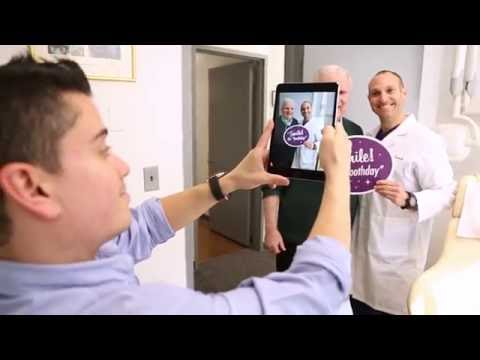
By definition, the best patients are engaged. They’re not just “shoppers” who are looking for the lowest price on a one-time procedure; they’re looking to invest in a long-term relationship. These “above-the-bar” patients keep their appointments. They appreciate the care they receive and they accept and follow through on treatment recommendations. Consequently, these highly engaged patients achieve the best outcomes and the highest levels of patient satisfaction. And engaged patients tend to have friends and family members who are a lot like them. Audience engagement is, of course, the key to a building a successful online presence for your practice. Trust is the currency of the web and being real and authentic online builds trust. Not surprisingly, the most effective way to create engagement is by sharing real photos of real patients. Authentic patient photos (vs. stock photography or manufactured content) open a window into your office culture, helping potential patients feel connected to you before they ever step foot in your office.
Social Dental also makes it easy to quickly request Google Reviews from your patients by getting their attention before the distractions of life take over.
The one thing that makes all of this work is for you and your team to genuinely care about your patients. Otherwise, asking to take a photo with a patient may feel forced and cause your team to feel like they’re imposing. When this happens, the process can feel more like a chore than a celebration and the idea of creating a lasting culture of patient engagement will never take root in your practice.
Developing a culture of appreciation is the most important way to grow your practice—online and offline. Visit www.socialdental.com to schedule a demo and
mention this article and Dayna Johnson and you’ll get a $1000 discount off the set up.


 I don’t know about you, but my insurance benefits changed this year … and if I was a patient in your practice, I sure could use a little help figuring it all out. This time of year, many of your patients will be walking in with new benefits. Sometimes they have a card from the insurance company … and sometimes they don’t. Now I am not asking you to take on the role of benefit coordinator for your patients, but many of your patients will need a little guidance. This is one area where you can exceed the level of customer service between your office and the office down the street.


 Let’s picture a postcard. This mode of communication is perfect for documenting your latest trip laden with landmark pictures on the front and a simple “Wish you were here” written on the back. Anyone can flip over the postcard, read your sentiments. You’d never write anything too personal knowing this postcard can be an open book. No need to safeguard this innocent letter.
Additionally, if you are receiving ePHI to your email, verify you are implementing secure storage procedures. Typically, (free) Gmail, Aol & Yahoo Mail do not store securely.
Additional Tips:
By familiarizing yourself and your team about these email procedures, you’ve taken the first steps to protection. The next step would be to figure out what works best for your practice and come up with a plan for implementation. And don’t forget, documentation of all policies and procedures is key!
About the Author:

 During my 22 years in dentistry, I have been both the trainer and the trainee when it comes to implementing new technology in the dental practice. People who know me see me as kind of a computer geek.


 One of the questions I would get from practices is, “How can we just send mom one message for all the kids’ appointments?” In the past, I would have to regretfully say it wasn’t an option, but now, thanks to all your requests, the development team has made it a reality. This will definitely eliminate a lot of the confusion with multiple reminders for multiple family members and the entire family can be confirmed with just one reply. Whoo-hoo!


CLICK HERE if your office needs HIPAA training or a Risk Analysis.
